Selected work, operating notes, and systems thinking

I build practical web, automation, and AI-security systems.

I'm David Ortiz. This is my personal proof hub: selected work, operating notes, and the decisions behind the systems I build, test, and hand off.

  • Web systems
  • Automation workflows
  • AI-security checks
  • RAG & notes tools
  • Operating notes
Live screens, not just claimsView portfolio
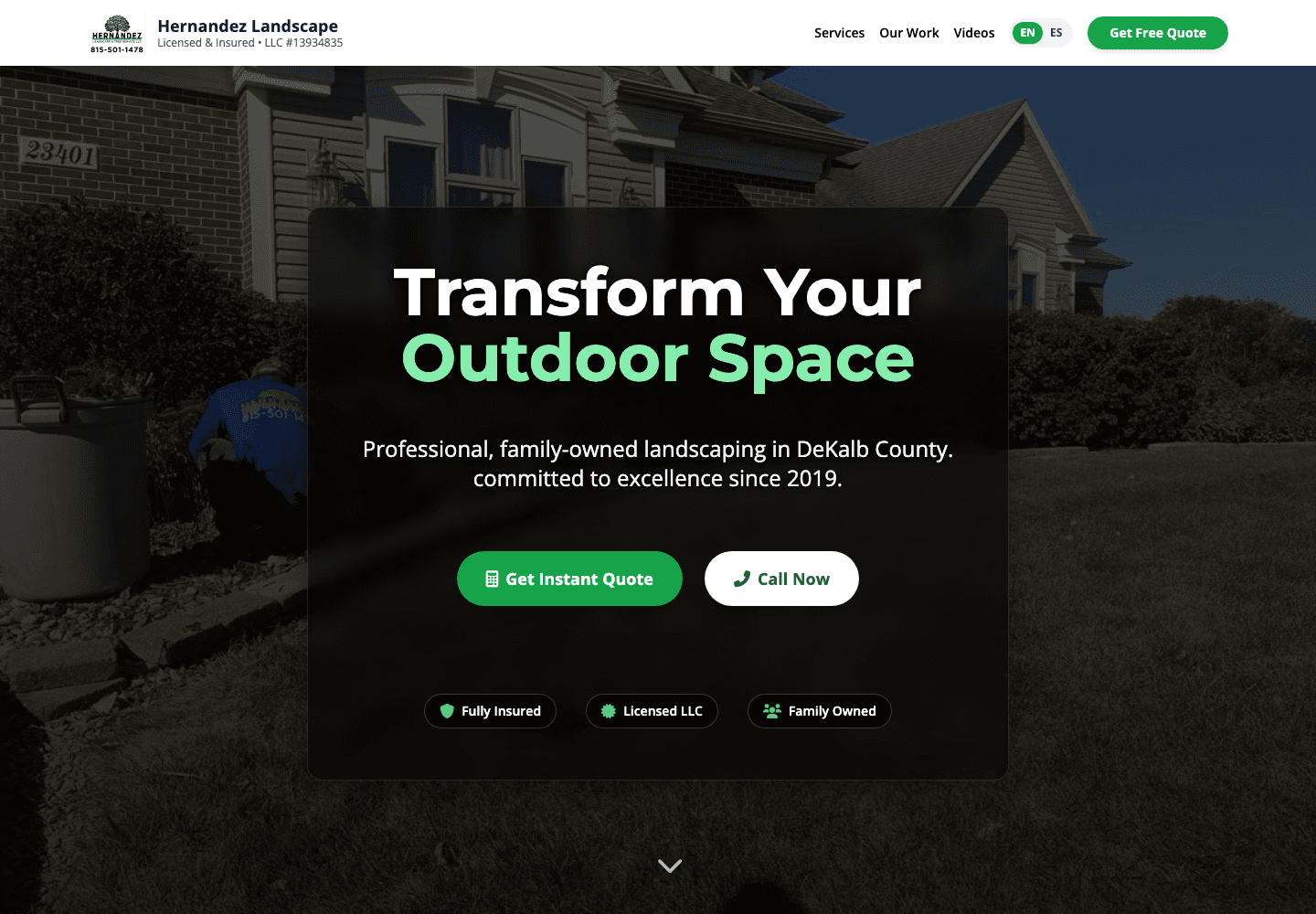
Screenshot of a local business website portfolio example.
Screenshot of services and trust sections from a local business website.Trust sectionServices, photos, contact path
Owner handoffDomain, inbox, social, recovery

Set up around the tools the owner already uses.

WebsiteClear pages, photos, services, forms
DomainA real address the business owns
EmailOfficial inbox with familiar forwarding
SocialFacebook, Instagram, WhatsApp paths
Security2FA, recovery, and handoff notes

Make the work visible before someone has to ask.

I show the customer-facing surface and the practical setup behind it: domain, email, WhatsApp/social paths, security basics, and a plain handoff. The proof is inspectable, not just claimed.

  • Selected work people can inspect
  • Operating notes on real systems
  • Automation and AI-security checks
  • Clear handoff, not hidden complexity
Illustrated local business system showing connected website, social, and contact paths.
Spanish-first demos

Pedidos, citas, servicios

Small-business flows for owners and customers who live on mobile, WhatsApp, and social.

Inspect it
Desk scene representing website setup, account handoff, and project notes.
Setup layer

Domain, inbox, social, handoff

The professional pieces around the site are part of the work, not an afterthought.

Inspect it

The practical layer behind the site.

A working local-business site needs more than a homepage. These are the pieces I connect and document so the owner can keep the system running after handoff.

Local Business Sites

Selected proof: a customer-facing site with clear services, forms, and a practical handoff path. Not the main offer, but a real thing I can build and explain.

  • Mobile-first pages
  • Clear calls to action
  • Bilingual-friendly copy

Domain And Email Setup

The surrounding professional layer: domain ownership, official email forwarding, and DNS checks that keep the business reachable.

  • Domain ownership
  • info@ or sales@ setup
  • Familiar inbox forwarding

Social And WhatsApp Paths

Connecting the site to the places customers already use, with a guarded WhatsApp path so the phone number is not exposed to scrapers.

  • WhatsApp guard route
  • Social profile buttons
  • Google/local links

Security-Minded Handoff

Account protection, recovery details, and plain-language notes so the owner can keep the system running without depending on memory.

  • 2FA and recovery
  • DNS/email checks
  • Plain-language handoff

Working lanes and proof people can inspect.

These are categories and proof cards, not a brand directory. Each one points to a practical thing I can design, connect, test, and explain clearly.

Web

Local Business Sites

Selected proof: customer-facing sites with clear services, forms, and bilingual-friendly copy. Used to show how I think about layout, contact paths, and owner handoff.

  • Next.js
  • Forms
  • Local SEO
  • Handoff
See live demos (pedidos, citas, servicios)
Systems

AI-Assisted Workflows

Practical workflows that split research, implementation, review, QA, and documentation into visible steps instead of hiding everything inside one prompt.

  • Codex
  • Claude
  • Browser QA
  • Runbooks
Knowledge

RAG and Notes Tools

Experiments around retrieval, cited answers, local notes, and the habit of checking the actual source before treating a generated answer as true.

  • RAG
  • Search
  • Citations
  • Obsidian
Ops

Automation and Cleanup

Small automations for intake, follow-up, project cleanup, and deployment checks, with the maintenance path documented before the work is considered done.

  • n8n
  • APIs
  • Scripts
  • QA
Safety

AI Security and Prompt Defense

Practical work on prompt injection, instruction boundaries, misuse resistance, and the checks needed before an AI-powered workflow should be trusted.

  • Prompt defense
  • Guardrails
  • Testing
  • Review
Read CTF writeups
Proof

PromptDefenders

A prompt-injection defense project: evaluation methodology, safe test cases, and checklists for hardening AI-assisted workflows.

  • Prompt defense
  • Eval methodology
  • Checklists
Open live demo
Lab

Razon Live Lab

Learning AI security and systems in public: streams, writeups, and sanitized demos, in English and Spanish.

  • Live builds
  • AI security
  • EN/ES
Visit lab

How I keep projects grounded.

The common thread is verification. I would rather inspect the actual surface and make a smaller honest improvement than write a big plan that never reaches the browser.

01

Start With The Real Surface

I look at the current site, social page, domain, inbox, or workflow first so the work starts from the real situation.

02

Map The Useful Version

I separate what customers need to see, what the owner needs to control, and what should be kept simple.

03

Build In Working Passes

I ship a working first version, then tighten the design, copy, forms, routes, contact paths, and edge cases.

04

Verify And Hand Off

I run the checks that matter, document what changed, and leave the owner with a clear continuation path.

Tools behind the calm handoff.

Visitors should not have to care about the stack. I use it to make the finished setup fast, reliable, secure enough for the job, and easier to maintain.

Frontend

  • Next.js
  • React
  • Tailwind CSS
  • Accessible UI

Deployment

  • Vercel
  • Netlify
  • DNS setup
  • Production QA

Automation

  • n8n
  • APIs
  • Shell scripts
  • Operational notes

AI Workflow

  • Codex
  • Claude Code
  • Grok
  • Perplexity
  • Obsidian

What I'm paying attention to right now.

This is the living part of the portfolio: systems thinking, practical security habits, useful automation, and proof that survives beyond a sales conversation.

  • Cleaner local-business websites with quote, order, or contact flows that do not feel overbuilt.
  • Repeatable AI-assisted delivery: research, implementation, review, browser QA, and a written handoff.
  • AI-security workflow habits, especially prompt injection, tool boundaries, and validation.
  • Better notes that preserve what worked, what failed, and what should happen in the next session.

Start a conversation about the work.

You do not need a polished brief. Send the project, the problem, the current link or file if you have one, and what would make the next step useful. I keep the public contact path screened so the phone number is not treated like an open spam target.

Best first message

What are you trying to build or fix, and what is the current state?

Phone spam guard
  • Public links start with project context instead of a bare phone number.
  • A future WhatsApp/n8n screener can label spam, ask one clarifying question, and keep human approval on replies.
  • Direct calls should happen after context, not as the first public CTA bots can scrape.